

Guide updated October 1, 2026 · By the ModulePilot team · 8 min read
A double-wall box for your wine bottles, padding for a glass lamp, an insulated crate for fresh produce, ten minutes of preparation for a personalized order… These costs are real. Absorbing them eats into your margin. Hiding them in shipping or revealing them at the last moment drives customers away.
There's a middle way: a fee announced early, explained clearly and calculated automatically. Here's how to set it up.
It's not the fee that drives customers away, it's the surprise
According to the Baymard Institute, the average online cart abandonment rate is over 70%. And among shoppers who abandon during checkout, nearly 4 in 10 cite extra costs that are too high (shipping, taxes, fees). It's the number one reason for abandonment.
The key word isn't "fees", it's "extra". The price seen on the product page is the reference point: anything added later feels like a bad surprise. A fee announced on the product page, on the other hand, becomes part of the buying decision. Customers accept it or not before committing, and don't feel tricked.
The law points the same way. In the EU, under the Consumer Rights Directive (2011/83/EU), which the UK's Consumer Contracts Regulations 2013 mirror:
- before the order, you must inform the customer of the total price and of any additional charges (art. 6);
- a charge the customer wasn't informed about is not payable (art. 6);
- an optional paid extra (gift wrapping, insurance…) requires the customer's express consent: no pre-ticked boxes (art. 22).
Build the cost into the price or show it separately?
There's no universal answer. Here's a grid to help you decide:
| Build the cost into the price if… | Show a separate fee if… |
|---|---|
| it's small compared to the product price | it's significant and tied to a constraint customers understand (fragility, size, freshness, made to measure) |
| it applies to all your products in the same way | it only applies to some products |
| it's paid for every item | it's only paid once per order |
| your competitors show all-inclusive prices | your product price is compared (price comparison sites, marketplaces) and the fee would penalize it |
| you don't need to justify it | it's regulatory (eco-fee) or must appear on the invoice |
Per-order fees deserve a closer look: a special preparation costs you the same for one item or ten. Building it into the unit price means charging it ten times to customers who buy in bulk, or losing it on small orders.
Per item or per order?
Ask this question for every fee, because it changes what the customer actually pays:
- Per item: the cost repeats with quantity. Secure packaging per bottle, protection per fragile item, handling per piece of furniture, cutting per made-to-measure piece, eco-fees.
- Per order: the cost is fixed, however many items. Insulated crate, admin fee, preparation of a personalized order, service fee.
Examples by industry
A few common setups:
| Industry | Fee name | Explanation shown to the customer | Applied |
|---|---|---|---|
| Wine and spirits | Secure bottle packaging | Individual protective shell so every bottle arrives intact. | Per item |
| Fine food, fresh produce | Insulated packaging | Insulated crate and ice packs to keep the cold chain. | Once per order |
| Lighting, glassware, ceramics | Fragile item protection | Reinforced padding and double box for fragile pieces. | Per item |
| Furniture, large appliances | Bulky item handling | Preparation and loading of an oversized parcel. | Per item, stackable with eco-fees |
| Made-to-measure products | Cutting fee | Cut to your dimensions in our workshop. | Per item |
| Personalized gifts | Personalized preparation | Engraving and quality check of your order before shipping. | Once per order |
7 rules for fees customers accept
- Announce it on the product page, near the add-to-cart button. This is the rule that matters most.
- A name that says what it is. "Insulated packaging" reassures, "Miscellaneous fees" worries.
- A one-sentence explanation focused on the customer: what the fee guarantees them (an intact parcel, fresh products), not what it costs you.
- A proportionate, readable amount. It should stay consistent with the real cost and the product's value; prefer €4.90 to €4.73.
- No stacking. One or two fees per product at most, and decide explicitly which ones can add up.
- Show the link between the fee and the product in the cart: customers should understand which item triggers which fee.
- Be consistent everywhere: product page, cart, confirmation email, invoice and terms and conditions.
How to calculate the right amount
Start from your real cost:
Fee cost = materials + preparation time × fully loaded hourly cost
Example for insulated packaging: insulated crate €3.20 + two ice packs €0.80 + 4 minutes of preparation at €30 an hour (€2.00) = €6.00 cost, excl. VAT.
You can then choose to charge the full cost, or absorb part of it to keep a psychologically acceptable amount. It's a business decision: what matters is that you make it deliberately.
What about VAT? In the EU, packing costs charged to the customer are part of the taxable amount of the sale (VAT Directive 2006/112/EC, art. 78) and generally follow the VAT rate of the product sold: the standard rate for a lamp, a reduced rate for food in many countries. For a single fee applied to a cart mixing different rates, have your accountant validate the rule you use.
Measure the impact
Before rolling a fee out everywhere, measure its effect over 4 to 6 weeks:
- the conversion rate of the products concerned, before and after;
- the abandonment rate between cart and payment;
- the average order value;
- customer service questions about the fee. If they pile up, it's often the name or the explanation that needs rework.
Automating these fees in PrestaShop
Applying these rules by hand (adding a fee to an order, explaining it by email, correcting an invoice) doesn't last long. In PrestaShop, the native options have their limits too: the "Additional shipping costs" field, for example, buries the fee in shipping and makes it disappear as soon as shipping is free. We compared them all in our guide how to add extra fees in PrestaShop: 5 methods compared.
Our Automatic additional product fees module applies exactly the rules in this article:
- the fee is announced on the product page, with its name, amount and your explanation;
- it's added to the cart automatically on a dedicated line showing the product concerned, and the customer can't remove it;
- it applies per item or once per cart, your choice;
- you decide which fees can stack;
- VAT follows the product's tax rule, or a fixed rule if you prefer;
- the fee appears in the order and on the invoice.
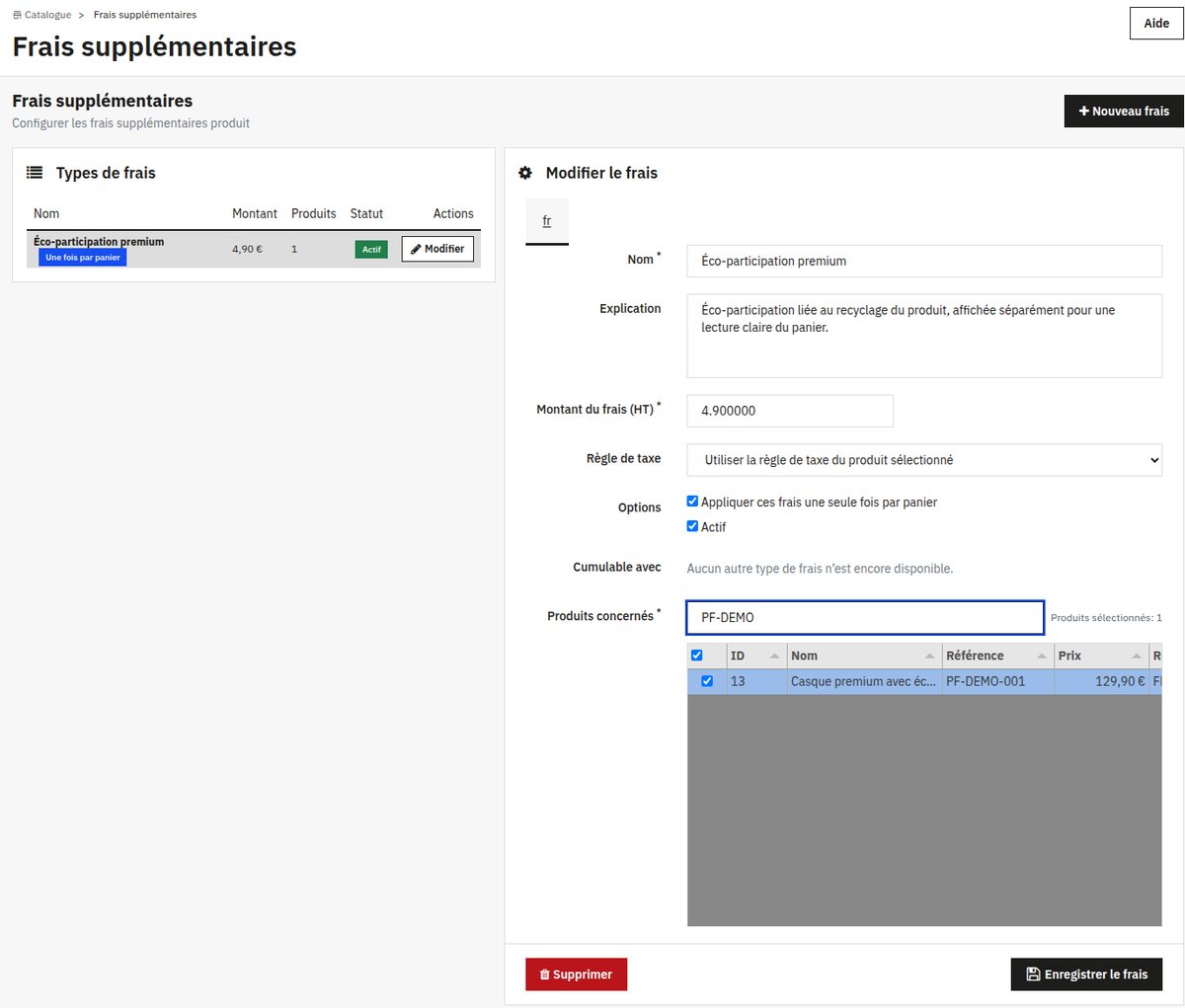 Amount, tax, stacking and products concerned are set on a single screen (back office in French).
Frequently asked questions
Is it legal to charge preparation fees in e-commerce?
Yes, as long as customers are informed before placing their order and the total price, fees included, is shown to them before payment. An undisclosed fee is not payable.
What's the difference between preparation fees and shipping costs?
Shipping costs depend on the carrier and the delivery address. Preparation, packaging or handling fees depend on the product purchased. Mixing them makes the fee invisible to customers and often makes it disappear with free shipping.
Can mandatory packaging be charged as an option?
No. If the packaging is required to ship the product, it isn't an option: it's a fee that must be announced and included in the total price. Only truly optional services can be offered as options, and never pre-ticked.
Do these fees have to be refunded if the customer withdraws?
When a customer withdraws, you must refund all payments received, including standard delivery costs (Consumer Rights Directive, art. 13). Plan to refund the fees tied to the returned product as well.
How do you display a packaging fee in PrestaShop?
The most reliable way is a module that attaches the fee to the products concerned and shows it on the product page, then in the cart. Native methods (price, additional shipping costs) can't display a separate, explained line.
Charge your fees with no surprises for your customers
Packaging, preparation, handling: with the Automatic additional product fees module, every fee is announced on the product page, added to the cart automatically and shown on the invoice. Set up in minutes, no code. €99 incl. VAT.